
Invoice clients and collect card payments without leaving your CRM.
Most service businesses run their billing in a completely different place from their customer records. The job is done, the invoice goes out from one app, the payment comes back through another, and somebody has to manually reconcile it all in a spreadsheet before the books make sense.
That gap between finishing the work and getting paid is where revenue leaks. Invoices go out late. Follow-ups are forgotten. Payments arrive in one system while the customer record sits in another, so nobody is quite sure what is actually owed.
WebDevAuto puts invoicing and payments inside the CRM. The job is done. You send the invoice. The client pays by card. The record is updated. The books sync. One system, start to finish, from first contact to cash in hand.
Invoicing and payments inside your CRM means you can send an invoice and collect a card payment without leaving the same system where you track leads, jobs, and customers. WebDevAuto's built-in billing layer handles one-time invoices, recurring subscriptions, and overdue tracking, and it exports your invoices to a QuickBooks or Xero import file so you load them into your books in one step instead of re-keying.
What it costs
Start with invoicing and payments
Billing ships inside the AI CRM, which is already selected. It is not a separate line and there is no setup fee.
$249/mo
$249/mo. No setup fee.
No setup fee. The CRM is month to month, cancel anytime. AI features are billed based on usage, you only pay for what you actually use.
Get paid without leaving the system
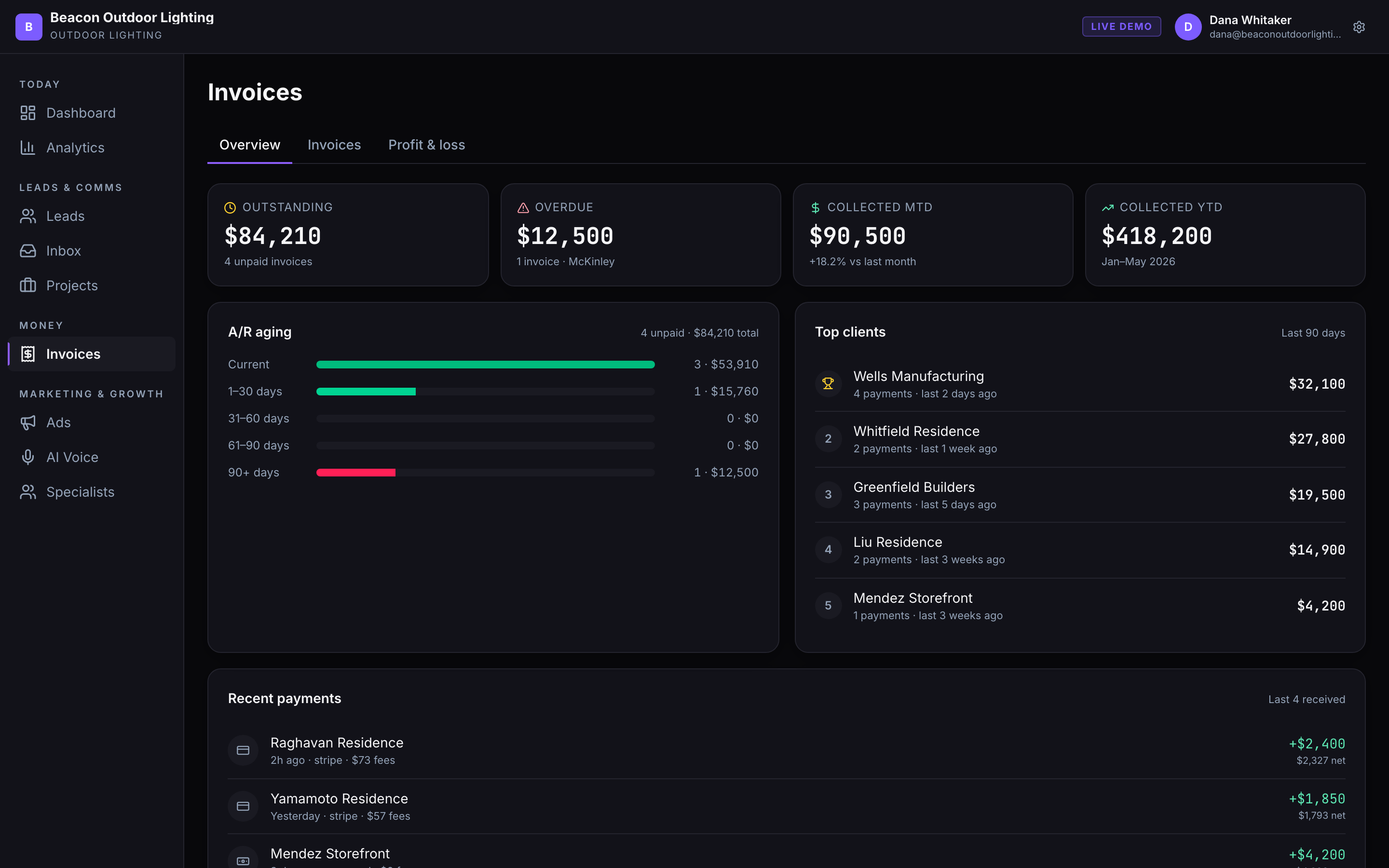
Invoicing, payments, A/R aging, and a running read on who owes you what, all tied to the same customer record as the rest of the platform.
Proof
What it is like to work with us
Second to NONE! WebDevAuto has been truly amazing to work with.
Not ready to check out
Want to see it against your setup first?
Tell us how you run things today and what you are trying to stop losing, and we will come back with what it takes, the price, and a timeline.
Prefer the phone? (385) 364-8062
How it works
Finish the job, get paid
Four things that shorten the distance between the work and the money. Card fees and the full billing detail are below.
Invoice from the job
The invoice is built from the record that already has the customer, the work, and the price on it.
They pay by tap
Card payment sits on the invoice itself. Most of getting paid faster is removing the step where someone has to call you.
Recurring, without babysitting
Maintenance plans and retainers bill themselves on a schedule you set once.
The books and the record agree
Every payment writes back to the customer, so what you delivered and what you were paid never drift apart.
Part of your WebDevAuto system
It runs on the same record as everything else.
This is one part of the AI CRM. It is worth more because the pieces on either side of it write to the same customer record.
- Local SEOGets you found, which is what makes the phone ring in the first place.
- Your websiteTurns that visitor into a call, a form, or a booking instead of a back-button.
- Ava, your AI receptionistAnswers the call 24/7, qualifies it, and texts the caller your booking link while they are still on the phone.
- Missed-call automationTexts back in about 30 seconds on the calls nobody picked up.
- Review automationAsks for the Google review after the job, which feeds the ranking that started it.
- Invoicing and paymentsYou are hereTurns the finished job into money in the account, without a separate billing tool.
Or take the whole system at once
Pick The CRM, and more customers to put in it in the flow above and you get the ranking that fills it, on the website plan the ranking runs on.
Want to understand how it works?
Here is exactly how we build, operate, and improve it: how card processing and Stripe fees work, what recurring billing supports, and how payments reconcile against the record.
Send invoices from the same place you track the job
- ▸Pull the customer record and job details directly into the invoice
- ▸Send the invoice by email from your own domain, with a secure pay link attached
- ▸Set due dates and payment terms once; the system tracks them from there
- ▸Attach line items, notes, or files to give clients the detail they need to approve and pay quickly
Get paid by card, built in and secure
- ▸Built-in secure card payments, accepted from any device
- ▸Clients click the link in the invoice email and pay in under a minute
- ▸Payment confirmation goes to both parties immediately
- ▸Every payment is logged to the customer record in the unified inbox so the team sees it without asking
Stripe processing fees are separate.
Recurring billing for contracts and repeat customers
- ▸Set up a recurring invoice on any schedule: weekly, monthly, quarterly, or custom
- ▸The client is billed automatically on the agreed date
- ▸Failed payments trigger a retry and a notification so nothing slips past without a record
- ▸Subscription customers stay in the same CRM pipeline as every other client, so renewals and service history live together
Track what is owed, what is overdue, and what is paid
- ▸Paid invoices are marked and timestamped the moment payment clears
- ▸Outstanding invoices show exactly how many days they have been waiting
- ▸Overdue invoices surface to the top with the customer contact one click away
- ▸Send a payment reminder directly from the invoice record without switching apps
Exports to QuickBooks and Xero so you skip the re-keying
- ▸Invoices created in the CRM are written to a QuickBooks or Xero import file
- ▸You load that file into your accounting software in one step instead of re-entering each invoice
- ▸Your bookkeeper works from a clean, CRM-matched file rather than re-typing the numbers
- ▸The export is one-way, from the CRM to your books, so the CRM stays the source of truth
Invoicing inside your CRM vs a separate invoicing app
| Separate invoicing app plus spreadsheets | WebDevAuto invoicing inside the CRM | |
|---|---|---|
| Where customer info lives | Split: CRM or spreadsheet for contacts, invoicing app for billing | One record: contact, job history, invoices, and payments in the same place |
| Creating an invoice | Re-enter customer name, address, and job details from memory or another tab | Customer record is already there; add line items and send |
| Following up on overdue invoices | Check the invoicing app, find the client, switch to the CRM, find the contact, then reach out | Overdue invoice shows the client contact; send a reminder from the same screen |
| Recurring billing | Manual invoice each cycle, or a separate subscription billing tool | Set the schedule once; billing runs automatically on the agreed date |
| Accounting sync | Export from invoicing app, import to QuickBooks or Xero, reconcile differences | One import-ready QuickBooks (IIF) or Xero (XML) file generated from your CRM invoices, no re-keying |
| Seeing who owes what | Open the invoicing app separately; no view of the full customer relationship | Live receivables view with full customer context one click away |
Every extra app between the job and the payment is a place where money waits longer than it should. The CRM closes that gap.
The rest of the system that feeds into billing
Invoicing and payments is one piece of the CRM. These are the parts that connect to it:
Payment confirmations, invoice replies, and billing questions all land in the unified inbox, where the whole team can respond.
New leads that become paying clients start at the top of the funnel. See how leads become contacts become customers.
The site that generates the inquiries that become the jobs that get invoiced. All connected.
Ava handles the incoming calls and logs every contact to the CRM, so billing always has a complete customer record to pull from.
Want to see the whole CRM in one place? Visit the pricing page for what is included at each tier.
Pricing for Invoicing and Payments
Invoicing and payments is part of the AI CRM ($249/mo). It includes the full billing layer: one-time invoices, recurring subscriptions, built-in card payments, receivables tracking, and accounting sync. AI features are billed based on usage, you only pay for what you actually use.
The AI CRM is month to month with no minimum, and there is no setup fee.
Engagement
Monthly Services
Three à-la-carte monthly services: website, SEO, and CRM. No setup fees, no deposits. The website runs on a 12-month term and SEO on a 6-month minimum, both month to month after; the CRM is month to month with no minimum. Take one or stack all three.
Not sure where to start? Run a free diagnostic on your current site first.
Website Design & Hosting
A conversion-engineered website that loads fast, captures leads, and stays maintained.
- Custom conversion-engineered website
- Loads in about two seconds
- Lead forms wired to your inbox
- Hosting + monitoring + maintenance
- No setup fee
Any business that needs a professional, high-performing web presence without a big upfront cost.
SEO & Google Business Profile Optimization
Ongoing SEO and Google Business Profile management so you rank on search, Maps, and AI assistant answers.
- Ongoing on-page + technical SEO
- Google Business Profile setup + optimization
- Rank on Google search and Maps
- Show up in AI assistant answers
- Monthly rankings + traffic reporting
Local service businesses where organic search and Google Maps are the primary lead source.
AI CRM
Customer database, pipelines, unified inbox, invoicing, and automated follow-ups, with AI billed by what you use.
- Customer database + pipelines + analytics
- Unified inbox (email + text)
- Invoicing with built-in payments
- Automated follow-ups + scheduling
- AI features (billed by usage)
- Ava answers your calls
- AI texts & emails customers back
- Content + ad generation
Businesses ready to systematize follow-up, automate ops, and add AI on their own terms. AI features are billed based on usage, you only pay for what you actually use.
Frequently asked questions
- Can I invoice clients and collect card payments inside WebDevAuto?
- Yes. You can send an invoice from the CRM and have the client pay by card using the secure link attached to the invoice email. Payment confirmation is logged immediately to the customer record. No separate invoicing account or card reader is needed.
- Does WebDevAuto support recurring billing for contracts or maintenance plans?
- Yes. You can set up a recurring invoice on any schedule: weekly, monthly, quarterly, or a custom interval. The system bills automatically on the agreed date. Failed payments trigger a retry and a notification so nothing slips through without a record.
- How does the QuickBooks or Xero export work?
- WebDevAuto generates a QuickBooks (IIF) or Xero (XML) import file from your CRM invoices, so you load them into your accounting software in one step instead of re-typing each one. The export is one-way, from the CRM to your books, not a live two-way sync.
- Can I see which invoices are overdue without leaving the CRM?
- Yes. The receivables view shows paid, outstanding, and overdue invoices with the number of days outstanding. Overdue invoices surface the customer contact directly, so you can send a payment reminder without switching apps.
- Is invoicing included in the base CRM price or is it an add-on?
- Invoicing, card payments, recurring billing, and accounting sync are all included in the AI CRM tier. There is no separate billing module or per-invoice fee on top of the monthly subscription.
See your invoicing and payments running inside the CRM
Live walkthrough
We will walk you through the full billing flow: sending an invoice, collecting a card payment, tracking receivables, and syncing to your accounting software.